
 US passport photo · 2 × 2 in
US passport photo at home in 2 minutes, with your phone
Skip the drugstore line. Our owl coach guides you live and checks every State Department rule. Free check · $11.99 only if it passes
- Accepted or your money back, for photo reasons.
- Checked against State Department rules
- No account · photo deleted after 72 hours
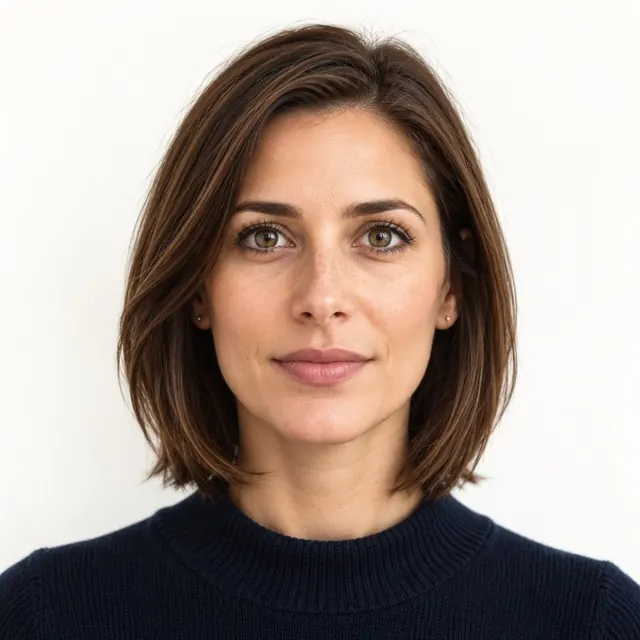
How it works
Three steps, about two minutes
You see the result before you pay. Nothing to install.
- 1
Take or upload a photo
The owl coaches you live (distance, tilt, light) and takes the shot when everything is green. A friend can hold the phone, or upload a photo you have.
- 2
We check every rule
Head size, white background, shadows, eyes, glasses, sharpness. Something off? You see why and retake it, free.
- 3
See your photo pass, then pay $11.99
Get the exact 2×2 file and a 4×6 sheet to print at Walgreens or CVS for under $1, or 4 prints mailed to your door.
Price
Less than CVS or Walgreens, and checked before you pay
Digital photo
$11.99
Get my photo- The 2×2 file, exact size
- 4×6 sheet to print for under $1
- Free retakes for 60 days
- Accepted or your money back, for photo reasons.
Digital + 4 prints mailed
$16.95
Get my prints- Everything in Digital
- 4 printed photos to your door
- Mailed anywhere in the US
- Accepted or your money back, for photo reasons.
Accepted or your money back, for photo reasons.
If a government office rejects your photo for a photo-compliance reason, we refund you in full and make you a new photo free. No forms to print and no photo to send back: claim from your order page within 60 days. How the guarantee works
Good and bad photo examples
20 common reasons a US passport photo gets rejected. Tap any example to see why.
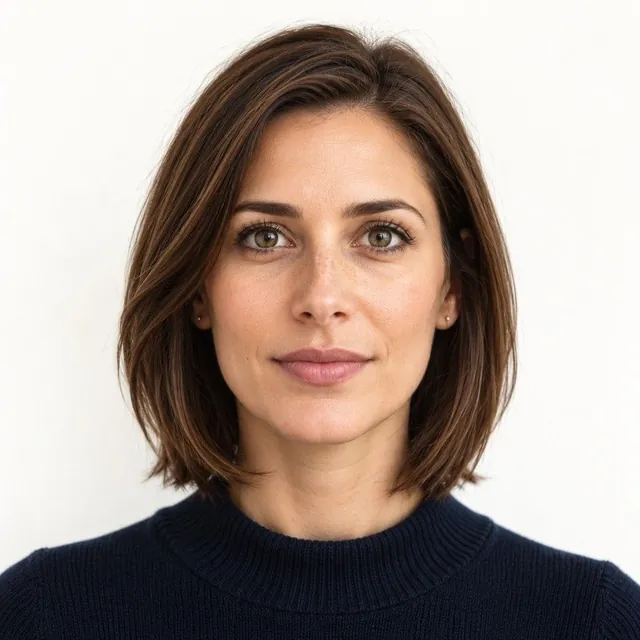
A good photo
Sharp and in color, with even light and no shadows. The head is straight, facing the camera and the right size, on a plain white or off-white background.
How to fix:
 We check this on your photo:
Example photos, generated; not real people.
US passport photo requirements
A US passport photo is 2 × 2 inches (51 × 51 mm), in colour, taken in the last 6 months, with your head 1 to 1 3/8 inches from chin to top. Plain white or off-white background, no glasses, neutral face or a closed-mouth smile. Take it at home and we check every rule.
| Photo size | 2 × 2 inches (51 × 51 mm), printed |
|---|---|
| Head size | 1 to 1 3/8 in (25–35 mm), chin to top of head |
| Background | Plain white or off-white, no shadows, texture or objects |
| Colour, on matte or glossy photo paper | |
| Glasses | Not allowed, unless medically needed (signed statement) |
| Expression | Neutral or a natural closed-mouth smile, both eyes open |
| Head covering | Religious or medical only, with a signed statement; one colour, full face visible |
| Taken | In the last 6 months |
Verified against Passport photos - travel.state.gov on Sep 30, 2026.
How to take a passport photo at home, step by step
Doing it yourself, without the owl? These are the steps that matter.
-
Pick the wall
Stand about one step in front of a plain white or off-white wall. No pattern, no texture, no picture frames or door edges in the shot. A step away from the wall stops your shadow from landing on it.
-
Face the light
Face a window during the day. The light should hit your face evenly, with no bright spot on one side and no shadow under your nose or chin. Avoid overhead ceiling lights and the camera flash.
-
Set the distance
The camera should be about 4 feet (1.2 m) from your face, at eye level. Holding the phone at arm’s length makes your nose look bigger and your ears smaller. Ask someone to hold it, or prop it on a shelf and use a timer.
-
Get the pose right
Face the camera straight on, head not tilted, shoulders level. Both eyes open, mouth closed. A neutral face is safest; a small, closed-mouth smile is allowed.
-
Take several shots
Take a few and pick the sharpest one. Don’t use portrait mode, filters, beauty modes or any editing: the photo must be the original.
-
Crop to 2 × 2 inches
The finished photo is 2 × 2 inches (51 × 51 mm), with the head, from chin to top of head, between 1 and 1 3/8 inches (25 to 35 mm) and centred. This is the part most people get wrong when cropping by hand.
-
Print it
Put two or more 2 × 2 photos on a 4×6 sheet and order one 4×6 print at a photo counter, usually for under $1. Turn off any crop or fill option, then cut along the lines.
What gets a photo rejected
Officials check these. Most rejected photos break one of them.
- Colour, sharp, not grainy or pixelated
- Printed on matte or glossy photo paper; no photocopies or scans
- Face the camera, head not tilted
- Both eyes open, mouth closed
- No filters, retouching or AI edits
- No red eye
- Even lighting, no shadows on the face
- No uniforms or camouflage; no headphones
- Infants: on a plain white or off-white sheet, no other person visible; eyes may be closed
Can you take your own passport photo?
Yes. The State Department accepts a photo taken by a friend, a family member or yourself, as long as it meets every rule: taken in the last 6 months, 2 × 2 inches, a plain white or off-white background, and no filters or edits. You don’t need a store, a booth or a photographer.
Alone, don’t hold the phone at arm’s length: it distorts the face. Prop the phone on a shelf at eye level, about 4 feet away, and use a timer, or let our guided camera take the photo when everything is right. With a helper, they hold the phone at your eye level.
With an iPhone or an Android phone
Open passportowl.com in Safari or Chrome: there is no app to install. Use the back camera if someone can help, because it is sharper than the front one. Turn off portrait mode, filters and beauty modes, since the photo must be the original.
Step-by-step tips for your phone: passport photo with an iPhone and passport photo with an Android phone.
Common mistakes at home
- Shadows on the wall behind you or on one side of your face
- Head too small or too big after cropping by hand
- Selfie distortion from holding the phone too close
- Glasses left on (not allowed since 2016, except for medical reasons with a doctor’s statement)
- Edited photos: filters, smoothing, background removal or AI touch-ups
- Wrong print size because the store print was cropped or zoomed
Made for
Your photo stays private
- No account needed
- Photos deleted 72 hours after upload
- Never used to train AI, never sold
- Payments handled by Stripe; we never see your card number
- An independent service, not affiliated with any government agency
Can I take my own passport photo?
Yes. The State Department accepts photos from anyone, including a friend or family member, as long as the photo meets the rules. Stand a few feet from the camera; holding the phone at arm’s length distorts the face, so prop it up or ask someone to help.
Can I smile in a US passport photo?
A natural smile is fine, as long as your mouth is closed and both eyes are open. A neutral face is safest.
Can I wear glasses?
No. Glasses have not been allowed since 2016, unless you can’t remove them for medical reasons, in which case you include a signed doctor’s statement.
Can I wear a hijab or other head covering?
Only if you wear it for religious or medical reasons, with a signed statement. It must be one colour, your full face must be visible, and it must not cast shadows on your face.
What size is the head in a 2x2 photo?
From the bottom of the chin to the top of the head, 1 to 1 3/8 inches, which is 25 to 35 mm. We crop your photo so it lands inside that range.
Where can I print a passport photo?
Order a 4×6 print of the sheet we give you at a Walgreens or CVS photo counter, usually ready in about an hour for under $1, then cut along the lines. Turn off any crop or fill option so the photos keep their size.
Can I use the same photo to renew online?
Online renewal needs a digital file, not a print. Choose “US online passport renewal photo” and we make the file the online form accepts.
What about a baby’s passport photo?
Babies follow the same rules, but their eyes may be partly closed. Lay them on a plain white sheet with no one else in the photo. Our baby mode guides you.
Can I take a selfie for my passport photo?
Holding the phone yourself at arm’s length often distorts the face and tilts the head. Ask someone to take it, or prop the phone up and use a timer.
Is a photo taken at home accepted for a US passport?
Yes. The State Department accepts photos taken by anyone, including at home with a phone, as long as the photo meets the rules. That is exactly what we check, rule by rule, before you pay.
What if my photo is rejected?
If a passport office rejects it for a photo-compliance reason, we refund you in full and make you a new photo free.
How long does it take?
About two minutes to take the photo. The check takes a few seconds, and your file is ready to download as soon as you pay.
Do I pay before I see the photo?
No. You take the photo, we check it, and you see the result first. You pay only once it passes.
Can I retake the photo later?
Yes. Retakes are free for 60 days after you buy, from the link in your receipt.
Can I use my computer instead of my phone?
Yes. Use your webcam, upload a photo you already have, or scan the code to continue on your phone.
What happens to my photo?
It is deleted 72 hours after you upload it, together with every file made from it. It is never used to train AI and never sold.
Do you retouch or edit my photo?
Never. Passport and visa photos must not be edited: no filters, beauty modes, smoothing, background removal or AI changes, and an edited photo can be rejected. We only crop and size your original photo to the official measurements; we never retouch it.
How can I pay?
With a card, Apple Pay or Google Pay, through Stripe. We never see your card number.
Is PassportOwl a government website?
No. PassportOwl is an independent service, not affiliated with the U.S. Department of State or any government agency. You submit the photo with your application yourself.
Guides
Other US photos
Ready in about two minutes
See the result for free. Pay only when it passes.
Get my passport photo